
PayPal is a widely trusted and secure payment gateway that allows users to make online payments easily. By integrating PayPal into Booktics, you can accept payments directly at the time of booking, improving your workflow and customer experience.
How to Enable PayPal in Booktics
To get started, go to your WordPress dashboard and navigate to:
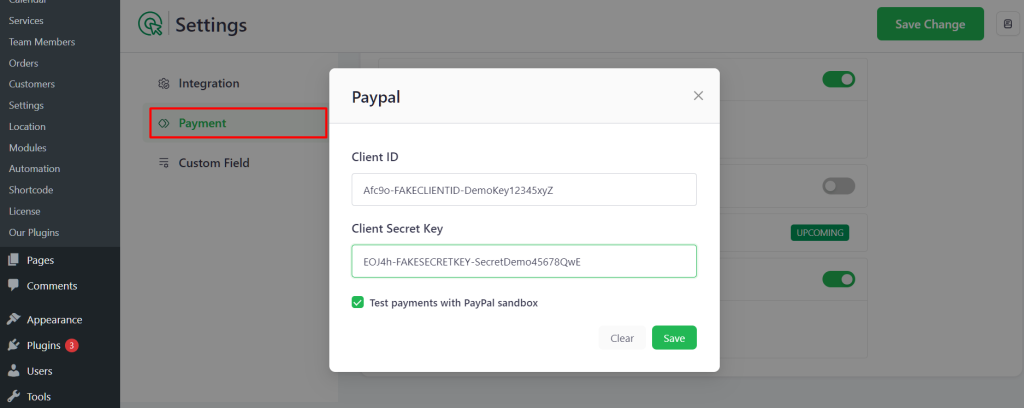
Booktics → Settings → Payment
- Click on the Payment tab from the left sidebar.
- Toggle the PayPal option to enable it.
- A popup window will appear asking for your PayPal credentials.
This pop-up requires you to enter your PayPal Client ID and Client Secret Key. You can also choose to test payments by enabling the PayPal sandbox mode.
Where to Get PayPal API Credentials
To connect PayPal with Booktics, you need to generate API credentials from your PayPal developer account:
- Go to https://developer.paypal.com/ and log in.
- Navigate to My Apps & Credentials.
- Click Create App and give it a name.
- After the app is created, you’ll see your Client ID and Secret Key.
- Use Sandbox credentials for testing, and Live credentials for real payments.
Once you enter the required credentials in the pop-up:
- Click the green Save button inside the pop-up.
- Then, click the Save Changes button in the top-right corner of the settings page to apply the changes.
This completes your PayPal integration setup in Booktics.